
How can I change the ratings of components, e.g. to simulate a high-power circuit?
In Yenka you can now change certain components’ maximum ratings – these can be found by double clicking on the component, and selecting the ‘Max Ratings’ tab from the Properties panel.
Why do electronic components drag on in 3D instead of as 2D symbols?
This can happen when your workspace (the white area) is smaller than the window size so that you see a grey border around it (typically when using a large resolution monitor). In this situation, dragging electronic components through the grey area causes them to be added as 3D components.
In order to avoid this problem, move the object pane so that it is over the white workspace area. Alternatively, you can increase the workspace size (from the “Space Properties” pane).
Why does my integrated circuit explode with the error: "The pin voltage was taken above the positive supply voltage...?"
This warning message is presented when the voltage on an individual pin of an integrated circuit (IC) is higher than the positive supply voltage by more than the rated value (normally 1V). This will occur when you use a higher voltage (such as 9V) in your circuit without changing the supply voltage (such as with a Vdd connector) from the default 5V supply.
To solve this problem, use a Vdd connector to make sure the supply voltage for your IC is higher than or equal to the voltage applied on any individual pin. In most cases, connect the Vdd connector in parallel with the battery or voltage source you are using to drive your input if this would also be connected to your IC.
How do I stop components exploding?
You can simulate higher-powered circuits by preventing objects from exploding. To do this, double-click on an empty area of the scene to open the Space properties pane. Click ‘Electronics’ > ‘Simulation’ and tick the box next to ‘Make objects indestructible’.
While this will prevent objects from exploding, it will not prevent simulation of circuits which are then impractical or unrealistic, as a result of this. You should exercise caution when using this mode.
Why are there parts missing from my imported model?
While Yenka does support many older file formats, there may be objects within the model that are outdated and are no longer supported. This includes old versions of the graph object.
How do I change the supply voltage for logic and microcontroller objects?
You can use a Vdd Connector (located under Lab Equipment > Power Supplies) to connect power supplies to integrated circuits (ICs), such as microcontrollers and logic objects.
How do I use a Vdd Connector?
A Vdd Connector allows you to automatically connect power supplies to integrated circuits and other electronics objects without having to draw wires between them.
To provide supply using a Vdd Connector, simply wire the Connector to the supply you wish to connect to your ICs (as in the example below). Yenka will automatically connect all logic objects and microcontrollers to your selected power source.
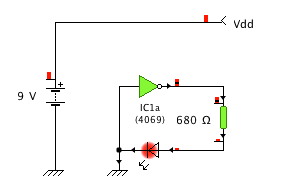
If you wish to provide different power supplies to different types of object (e.g. a different voltage for microcontrollers and logic gates), you can change which object types a Connector will supply from its Properties pane, which can be accessed by double clicking the Connector. If you are using multiple Connectors for different types of object, you should give each Connector a different name, since otherwise they will all be connected to each other and will likely short-circuit the power supplies.
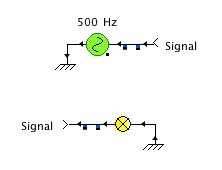
The provided “Vdd” Connector (located under Lab Equipment > Power Supplies) will, by default, supply all possible objects. We also provide a “Signal” Connector, which will not supply any of them by default. You can use it to connect different parts of a circuit together without having to draw wires, since all Connectors sharing the same name will be automatically connected to each other, as demonstrated in the following example:
Can I make my own custom electronics objects?
You cannot currently make your own electronics objects. We include a large range of real life electronics components in our electronics product and you can select from a range of transistor and diode models, etc. If you would like a specific electronics object included in Yenka, then please contact us at support@yenka.com with your suggestion.
How do I simulate an oscillator circuit?
For oscillator circuits, the simulation time-step should be set manually as follows:
- Edit the circuit.
- right click on the background and select “Properties” in the menu.
- Choose “Simulation”.
- Enter the desired time-step.
The smaller the time-step, the longer it takes to simulate a circuit, but the more accurate the simulation is. It is recommended that the time-step is set to 1 x (20 x oscillator frequency). When a signal generator is added then the simulation time-step is set 1 x (20 x signal generator frequency), unless the user has set a smaller value. This explains why a signal generator affects the simulation results.